Saturday, November 16, 2013

Obstacles being overcome...

Things this semester have certainly smoothed out!  YouTube access has been granted and the tutorials on the class Google Site can be reviewed and utilized as needed. Students have already told me they prefer the freedom of choosing when to access the information to listening to a class lecture (however fascinating I can be!).

Smooth sailing -- a picture of peace underway!
I wrote another grant to afford EasyBib Pro. It is small with strong instructional reasoning to support the use so I fully expect to have it for next semester. Several students who have been through the paper version and the digital transition will still be in the course for their last semester as middle school students. They will be the defining line about the usefulness of this tool!

We've also discovered a picture capturing tool, Awesome Screenshot, that does the work of Jing/Screencast. It has already been put to good use for the student doing the Google Treends/Sickle Cell project.

AND, a big bonus -- the students have begun to keep the GALE database link, Library of Congress, favorite peer blogs to watch, Citation Machine, and my blog* on their blogs as links. That has made their blogs more of a command central for their projects.

It's becoming smoother sailing!


*my blog -- Every semester I do a research project along with the students to model the steps. i write posts about the lessons, document my questions and path of research. The recent semesters the projects have been bobbleheads, Follow the Drinking Gourd (where I built a gourd ukelele), and figs as a farm market product.  This way, if they get stuck about how to explain a lesson, they can review my blog and follow the example.

Friday, October 25, 2013

Google Analytics and Research Partners

The old way, yikes!
The Google site Shared with parents of the Gifted Academic Program students now has Google Analytics enabled so data can be capture identifying how many visitors view the site, how many per page, how long they stay, and what percentage of new to return visitors. This will add another layer of data to what the surveys say and how many comments were left by the visitors.

Initially, getting this feature installed was a bit of a problem. Repeat visits to IT personnel kept everyone on alert as day after day codes were not 'sticking' to pages and tracking appeared uninstalled. However, after a couple weeks the glitches were identified (or actually, were overcome since some snags seemed to disappear after repeated attempts to install).


Thursday, October 24, 2013

Another arm to a digital class...

This year we address another aspect of digital learning in this middle school research class -- connecting home experts to school research efforts. A website called Research Partners has been built with different pages for each research topic this semester. Parents and families of class members are encouraged to review the site, choose one or more topics that appeal to them and offer ideas for expert resources. The point is to use the digital arena to have these 7th and 8th grade researchers learn that local resources can be primary sources.

Connecting home experts to school research efforts. Libraries offer
workshops and tutorials for finding primary sources.

Friday, May 24, 2013

Get well wishes from the class...

singerofstrangesongs.blogspot .com
One of the students broke her hip in track yesterday and could not be in school today. The class started a get well document and lo and behold, she joined us. We enjoyed cheering her up and she wrote her appreciation of the effort. We sent YouTube links, Google Images (cited of course), and bad jokes we made up ourselves.

We cheered her up!

Reviewing the Paper has been a snap...

Reviewing the students research papers has been a snap with the Google Docs and Chromebooks. I can carry the equipment and check their paper where ever I happen to be: at home, in meetings, hotels, mother-in-law's hospital room. The fact that a spreadsheet or document shows up bold in my drive when someone has done something has been a quick way to know if a student is ready and wants me to see the corrections. In fact, in some instances it has been helpful for both the student and I to be on the same page at once so edits can be explained.

Today, I could not travel back to my home school in time for the 4th period class. I was able to be on the students papers while not there, so they knew I could see what they were doing. The librarian kept an eye on the class (my office is in the library) and they worked until I arrived.


Monday, May 20, 2013

C3B4Me Check-in

The research papers have always followed a C3B4Me protocol. The students have three other people read and edit their papers before giving it me. The readers have 3 criteria to follow: 1) does the paper answer the essential question?, 2) does it move logically from point to point?, and 3) is it grammatically correct, and in active voice. One person of the three can be the students' Critical Friend and two have to be adults.

To coordinate the time when I see the paper the classes and I have set up a community check-in spreadsheet. The students fill in their name, the three names of the people who read their paper. When they have made the corrections the 3 readers suggested, they type Ready into the next spreadsheet cell so I know it's my turn. When I'm done I type my initials to replace the word Ready and the students know it has been checked and can be reviewed for the next round. When the paper is completed, and has my final approval, a cell is blacked out with the word DONE reversed in white.

The beauty part is the students can see at a glance where they are in the process, and where others are as well. They have been more willing to collaborate with those needing assistance to get caught up. Since they can work from home, I see work being done from day to day without my prodding.

My only suggestion might be Google Hangouts.

Wednesday, May 8, 2013

New Insight Regarding the Study...

In a moment of quiet repose about what's happened with the study this semester, I believe I can see how two opposing views came together and clashed. Like two people acting on two versions of the same story, so has this research class and the technology department.

It comes down to the interpretation of the word research.
This course is doing advanced, college-level research. The students take existing knowledge about a topic, and pursue new information that adds to the existing information to move into new territory. It requires a broad sweep of investigative resources and generation of authentic data to prove or disprove theories. Many search engines, databases, and presentation resources are necessary to complete the complicated task of writing a research paper and presenting the findings to an audience.

The rub (as they say) is that the word research is used by teachers and is understood at the main offices to mean term paper project (a retrieval project). Information is gathered, and then reviewed in a paper to demonstrate a level of understanding.

For retrieval, using one search engine is fine. Using Google or even Google Scholar is fine. Writing a paper with the 'research' option open to the side where information can be 'Googled' as the paper is being written can work. The student is reviewing knowledge and presenting an understanding of existing knowledge.

For research, the skills are different. Many information sources are cross-referenced, then proved or disproved. The facts are located, checked for legitimacy, then put into notes to be sorted and organized later when the authentic data proves or disproves them. Researchers are reflective and make judgments based on considerations of many pieces of information and ghost nuances.

The Chrome Book is excellent for usual, run-of-the-mill term papers. The Chrome Book can be made excellent for research with the addition of apps. The IT department thinks we are doing term papers and that why we do not need any of the apps. They are thinking mainstream thinking, not gifted.


YouTube Tutorials..

...and what a shame the school technology department cannot figure a way to allow access to the YouTube tutorials that would make learning how to use the Chrome Books magic...or learning how to access databases, or make citations, or any number of drill-and-kill skills that all the students will use when they are ready. Taking the lesson once, to everyone at the same time, ensures I'll be reteaching it again and again as students need the information.

A self-pacing, independent study course allows students to move at their own pace with their personal abilities. Being able to access information when it is needed enhances and anchors the knowledge in the learning process. This is a best practice pedagogy, researched with empirical studies.

Online tutorials can unleash self-directed learning.


Pros and Cons Overview

When I wrote for the educational grant, I was shooting for updated technology that would allow the students to use digital resources for their research efforts. The Chrome Book was the updated technology suggested by the technology department because of the wide variety of add-ons that would allow space for individual investigations while still permitting me oversight.

There is good stuff to talk about:

1) the technology is faster;
2) the students access their work more efficiently with very few (if any) lock-ups or shut-downs;
3) they can access their work on personal devices on the way home or at their after-school activities;
4) the peer pressure has encouraged longer and deeper reflections about the lessons in their blog posts;
5) the research papers are getting written faster without me holding everyone's hand;

However, the apps mentioned in the grant were
EasyBib (a note-taking system to replace the index cards),
Diigo (an annotating program to highlight online passages of interesting articles and then store for further use),
Jing/Screencast (image capturing program that can build layers of text on the image and then make videos), Blogger (to be used as the online journal), and
Picasa (image managing and editing tool).

When the Chrome Books arrived, Blogger was set up and the students began keeping daily records of the lessons and how the lessons applied to their projects.

As the projects advanced, however, the lack of the other apps made work-arounds necessary.
EasyBib was unusable because the format we need to use (APA) is a purchased app, which was not included in the Chrome Book package we got.
Diigo, the editing version of Picasa, and the video capabilities of Jing/Screencast were not included, but would have permitted thorough completion of the research projects.

Chrome Books do not recognize Microsoft Word, so moving from existing work on thumb drives or Microsoft products has been a problem. Converting a Word document to a Google Doc loses formatting and arrives messed up.

The Chrome Books do one thing, search Google. They do it fast, and they can do it anywhere provided the server can be accessed and the battery is charged. However, they do not hold a 6 hours charge. They DO get through 4+ class periods before needing a charge to get through another two complete classes and since I teach two classes per school, that's enough for two days at each school. So, no complaint on that score, just an observation.

Anything beyond the basic Chrome Book set up is an extra expense or requires additional set-up. Other search engines have to be bookmarked (then not bothered with, as I observed students doing). The school database URL had to be copied into a Shared document (which was soon forgotten, meaning the students relied on non-scholarly information). Notes and sources were done in an Excel spreadsheet so they could be coded together (that got too unwieldy to manage, or was not bothered with) whereas EasyBib would have generated online notecards that are cited immediately and dropped into a Reference page while the 'cards' could be sorted into paragraphs much in the way online Solitaire is played. The note card issue has been especially difficult since being able to sort note cards is what makes writing a research paper easier.

The Chrome Books, while quick to start and getting to the students work, have not been the panacea they would have been had they come with the apps necessary to make the research projects more than retrieval projects. BUT, overall, the impression is positive and worth doing again.

Tuesday, May 7, 2013

Pictures and editing images

Editing pictures has been an issue now that we are into our research papers and thinking about presenting the research findings in a public showcase. The Chrome Book allows storage of photos, and there's some adjustments that can be made, but editing and enhancing the image like could be done in Jing, Screencast, or perhaps Picasa cannot be done because those were not purchased.

When this study began, the request was to have the tools these students could use to produce professional products with digital resources. That has not happened. Although the Chrome Book has been a helpful convenience for students to move around and work anywhere, and for me to see their work from multiple places, it has been a glorified laptop. The add-on tools are the resources that would have given the students the ability to digitally create their research on a bigger scale than the paper/pencil format did.
www.thoughtfrompastorbrent.com

So in the end, taking notes and editing pictures and generating work using YouTube tutorials did not happen. In fact, I would say it made efforts more challenging since the goal could be seen but still unreachable.

Some days I believe it might have been better to keep with the notebook journals and index cards.

Heading into the research papers...

Surveys done with Google Forms had mixed reviews. The biggest concerns involved getting recipients to access the survey. Sometimes they worked fine, sometimes there were issues and many recipients did not take the surveys. A solid review of procedure is worth considering for next year.

One issue with surveys I had, as the teacher, is making sure I knew what my students were doing. Some students moved directly to their surveys without reading the handouts available on the class Site. Those surveys were not written with proper flow, or focus. With monitoring 18 students, each at different stage of research, my Share With Me file is enormous. Keeping track of where everyone IS at any given time has been a problem. A couple last minute 'catches' were necessary. This is a prime example of why Teacher Dashboard is critical as a monitoring tool.

It's a case of too many irons in the fire!


Thursday, April 25, 2013

Instruction across 2 schools

Today I could not get back to my base school in time for the 4th period research class. The librarian at the second school was informed and she allowed the students to work in the library. The students knew what was expected and were moving ahead with their projects using Chrome on the library desktops.

When I got a break between assessments in the first school, I jumped into my Google Drive and went to their work. One was working on notes for his project. I gave him some database assistance and asked him to remind the other student to Share his work with me. A moment later, the other student's work appeared in my Share Drive. I made my comments and moved on to other work.

Both students were surprised, but I'll bet money they were pleased they were doing what they should have been since I 'appeared' like magic.

iamaceltic.it

Tuesday, April 23, 2013

it's in the small details

Today the students began thinking about the presentations for their research. Because they want their displays to be innovative, several all already trying to figure out how to get images and music on their Chrome Books. We are blocked from Youtube so one student is downloading the Stevie Wonder song Superstition to his thumbdrive and will be using the Chrome Book as a speaker.

Images are proving to be a different animal. SketchUp (for planning the display) and Picasa (for editing pictures) seem to be other apps we were led to believe would be part of the Chrome Book purchase, but apparently were not 'part of the basic package'. So, along with EasyBib, Diigo, and Teacher Dashboard....extra money should have been built into the grant. The absence of EasyBib, in particular, became apparent today when two of the students who have taken this course before said she'd rather have been using the index cards all along because now that it's time to write the paper, she cannot sort her notes into the outline (something EasyBib does). We figured she would have to print out her spreadsheet and cut it up to sort.  Going through a multitude of clicks and copy/paste maneuvers just takes too much time.
nickagin.bigcartel.com

Now I know. I should have investigated the apps myself instead of relying on advice so I knew what to include in the grant. Live and learn!


Thursday, April 18, 2013

Surveys and Spreadsheets

A couple observations about surveys and spreadsheets that I must share:

First, all my students produce some authentic data to prove or disprove their essential question: interviews, surveys, and experiments. It is the first-hand knowledge that makes the difference between a research project and a retrieval project. There are handouts guiding the procedure for writing a survey, interview, or experiment...and then there's the struggle of interpreting data.

That's the snag with students who want to do surveys. The rule of thumb is more is better, but the tabulating of 'more' drive many students crazy because of the time involved. A student may want to survey 6th, 7th, and 8th graders for information and then be able to see a pattern of change as they get older, but the numbers have be calculated first...and sometimes the calculating becomes too large a hurdle to overcome.

peopleperformancellc.com
With a survey done as a Google Form, the answers drop into a spreadsheet immediately which can then be added, or averaged, or whatever. It makes the statistical end of a survey so much easier!

This only work with people who have Chrome, or will copy and paste the link address into the URL box, but overall it IS thrilling to come back from whatever sports practice here is and get answers!


teacher commentary...

I find I make more pointed, on-the-spot, comments to my students' work with the Chrome Book technology and the Cloud. It seems that jumping in when the time is right is working better than trying to make a blanket lesson for all. Perhaps because it is subtle and private -- I make them on papers and in blogs. It could be because learning is deeper when the information arrives when the need appears, or perhaps it's because the teaching becomes individualized and not intimidating. One student I'm thinking of in particular would not normally ask for help, but eagerly leaves comments for me and takes advice readily.

From this standpoint, the semester is going smoother.


Cloud-y Days

Yesterday, none of the students could access their Drives. They were able to navigate through back doors to their blogs, but only to view them as a guest would who had stumbled on them. They did not do work other than do online searching for information. Unfortunately, many are now at the survey stage, or writing stage. Being able to access their work is important. Although my office is IN the library, most of the research work has been done so being able to make interpretations of survey data and write the research papers is the next step...a step not easily buttressed with manual labor (writing).

feroniaproject.org
We later learned this was a national blip, so it was not our equipment or server. We reviewed a backup plan in case this were to happen again. All students have been told to print out their survey data so they can make interpretations off-line. Research papers are saved on a thumbdrive in addition to the cloud so it can be worked in spite of no Cloud services.

A back-up plan is vital!


Wordle and Java

One of the resources I like to use is Wordle -- a word-cloud generating website that allows students to copy and paste their text into a box and get back a montage of words that sizes each word based on the number of times it was used. It is a visual presentation students can use to check their writing for word over-use.

Unfortunately, our Chrome Books cannot access Wordle because it involves Java Script. The same thing happens with TestNav, the Pearson tests Virginia uses for the SOL assessments. So, Chrome Books will be useless for the end-of-year SOLs.


Wednesday, April 10, 2013

learning new things everyday

We are learning new things to do with the Chrome Books everyday. Yesterday we learned that Sharing a link to a Form does not guarantee the potential respondents will necessarily be able to open it. They need to be in the FCPS Google domain. Also, traveling into and out of the domain can cause issues.

Today students learned how to screen shoot information to include as a blog post. Along with that is the process for bringing up the keyword short cuts available on Chrome Books. Another reason it would have been nice to have gotten some training beforehand.

Discovery.

Tuesday, April 9, 2013

Mid-way survey and student work...

The students took a survey yesterday about their perspective regarding the research work they are doing now that the Chrome Books are here.  All but one took the survey (she'll take it upon return to school tomorrow morning). The results seem to indicate, generally, that they think they are getting more done in a shorter period of time.

With a more detailed review of the answers, it appears the students who didn't perceive much difference in the amount and quality of research work before and after are the students who haven't done much all along. It was the students who were trying to access databases, take notes and complete daily target dates that have noticed the biggest differences in work efficiency. The students who have never taken this course before, and who have never had to produce a handwritten journal and note cards, are the ones who do not notice much difference in quality or quantity of work output.

So, my preliminary opinion so far? Two observations: 1) You can lead a student to research, but if the curiosity and persistence to dig deep for information is not present, no amount of new technology will make those traits appear. 2) Without knowledge of how tedious research CAN be, and HAS been as recently as last semester, the new technology is the norm and therefore not better or worse. In those students, the only difference has been the time it takes to log in.
rozesto.wordpress.com

Thursday, April 4, 2013

Critical Friends

Today I instituted a new course requirement: critical friends. Every student's homework tonight is to locate 2 or 3 people who will agree to be critical friends. A critical friend is someone who helps with a project by making constructive useful suggestions and comments. A critical friend assists with ideas and support when th e project needs propping up. A critical friend is valuable for successful critical thinking and reflection.

Making this a new requirement should help on a couple levels: they choose who they want to work with (and trust), they collaborate willingly and therefore challenge the ideas and thinking that happens, and build an deeper interest in their topics by reflecting on the CF's comments. They can share their work with the CF as they do me, so there is a mutual understanding that no one has all the answers but working together generates new perspectives.


Trials for the study..

Yesterday and today we tried some trials:  database access, Google Hangout, and working outside the office.

Accessing databases instead of search engines has been a problem. The students are doing research, not retrieval projects. Being able to access scholarly information is critical. Although Google Scholar may present articles, studies, and books, the students cannot get to them without signing in or paying to read them. What we've done is worked with the librarian here at school who sent me the link for the Gale Group database (purchased by the school system). I put it into a Google Doc and shared it with the students. Now they all have access to databases!

The Google Hangout doesn't work because the students don't have gmail accounts. I understand students at another middle school in the county has gmail accounts. That may be where this needs to go to allow for the critical friend collaborations.

Chromebook outside.
Taking the Chrome Book and working outside the office, into the library, was successful as far as I could see. One student who tends to be quiet, and tends to prefer quiet, took advantage of working alone outside the group of chatty middle school students. Two students who tend to dominate conversations in one way or another worked in the library and got a lot done AND did not irritate the others with constant vying for teacher attention. All in all, a worthwhile trial of personal freedom. The note spreadsheets look like everyone got work done in their own way and at their own pace. As the weather turns warmer, we'll try working outside and see how that does.


Chrome Book on the road...

I've taken the Chrome Book home and to Williamsburg and back and forth from school to school. In all instances I can access my work, my student's work, and share my semester project with my students. I can make comments and offer guidance as they make notes, generate surveys, and collaborate with their critical friend. I have been impressed enough with this equipment to consider purchasing one for myself this summer.

Wednesday, March 27, 2013

Timed Test of Two Technologies

Today the students helped me perform an experiment timing the new equipment against the old. We set up two Chromebooks and scrounged up two of the old laptops. Everything was set up with the black screens. We timed how long it took to go from black screen to Drive. Four students worked at each setting and called out the word Drive when they had successfully accessed their Drive.  The results were amazing:

Chromebook 1 -- 24 seconds
Chromebook 2 -- 28 seconds

Laptop 1 -- 5 minutes, 40 seconds
Laptop 2 -- 10 minutes, 30 seconds

Even if the lowest laptop time to access Drive, 5 minutes, is considered, that would mean 4 1/2 class periods of the 44 days of instructional time to get to the work that needs to be done for the course. Rounding up the Chromebook time to 30 seconds would bring the lost instructional time to 22 minutes.

blog.thistle.com


Tuesday, March 26, 2013

Minutes to Seconds

luxist.com
Additional aspect of the change from laptops to Chromebooks: timing the start up.

The students want to do an experiment tomorrow. We going to set up two laptops and two Chromebooks to time how long it takes to get logged into Chrome on each one.

I feel certain we know the fastest option, but how fast?  What measure can be put to the time it takes to get into the task at hand?


Chromebooks arrive, orientation is done....

Today the Chromebook orientation happened with all four classes. The IT Department specialist visited from the School Board Office to walk the students through the process of logging into the network then signing onto Chrome. The various classes addressed the orientation in different ways.

After the business of getting onto the network and into their work was accomplished, first period [class of students new to this research course] spent all their time playing with background images and avatars and basically playing with the look of their Chrome profile. When they were told the students who come after them on the machines may change the background, they were a little bummed but not enough to stop experimenting with uploaded images.

Using the Chromebook webcam as a tool.
Second period [the research course veterans] immediately began to use the Chrome Books as a tool. One student doing a project about chickens and eggs had made a stuffed chicken as part of presentation showing how chickens are crammed into a battery cage. With the help of her colleagues, she shot a picture of the chicken with the Chrome Book webcam and sent it directly to her blog. We posed it with proper lighting and staging -- it looks like a studio photograph.

The students explored settings and options. Two discovered they had access to YouTube, an application we are not supposed to access, and a discovery I was thrilled with because that meant the YouTube videos on our class Google Site would be accessible. But, as is the case, someone spilled the beans to IT as though it was a new trick he learned how to do...which of course IT snapped to immediately. Other students kept giving the student the evil eye saying in meaningful ways. "NO, you are mistaken as usual!"  No middle schoo student likes to be shut down, so he fought back proving that yes, YouTube exists! The veterans took the opportunity to go to Google Site for the class and watch the tutorials for the course.

Later in the day there was no YouTube.

Tomorrow will be their first day using the Chrome Books for their work. It will be interesting to find out what their perception of how learning and research has changed.

Saturday, March 23, 2013

Mid-Semester Survey

Actually, the Chrome Books arrived right at mid-semester, the perfect time since the class moves from the lessons right into the active research for their projects.

With the new equipment now in-house, it is a good time to catch immediate perceptions with a survey. Today, I am considering a survey limited to 4 or 5 items to gauge the immediate perception of the differences between old and new ways. After conferring with my adviser, the questions will focus on work differences. Initially the questions will have a ranking scale, each one followed up with a short text question for further comment:
1--getting the work session started (logging on);
2--accessing resources;
3--collaborating with others;
4--amount of work accomplished; and
5--school and home experience (comparison).

The students will have about a week of Chromebook use before I give the survey. That way the laptops will still be remembered, and they would have gotten used to the new set-up.

Although I would like to say I know what they'll say, I am curious to find out to what extend the view of their projects change when the frustration level is lowered/eliminated from the classwork equation.
godsownamycolleen.blogspot.com

...Oh NO!!!

I arrived to my office earlier than usual yesterday because I was leading a field trip at 8am and therefore needed to set up the laptops outside my door into the library, with all the appropriate cords and power strips, so the students would get the best connection possible without the librarians having to call IT.

bugeyed.usgrit.net
Upon opening the door I saw the new Chrome Books on the table where the laptops had been. I knew I was supposed to be thrilled [at any other time I would have been] but at the time I was furious. There had been no notice, no warning, or training or orientation for using the new equipment and I was leaving in 45 minutes...and leaving students with no laptops and no way to use the new stuff.

I never did so much hustling and preparation for alternative plans [Plan C] if Plan B did not work out...which was to work some political magic to get the librarians to let my students use all the library computers for two periods!  Luckily, she worked around some classes that were scheduled to arrive and my students got the desktops for the morning. Thank You Librarians! I had to make sure the IT folks knew not to do anything until I returned. I was NOT going to have my classes oriented to equipment I had not touched myself.

Later when I returned I learned the IT folks from the SBO couldn't get the Chromebooks to connect to the internet anyway. The lead expert said it was because they did not recognize our domain yet. Yikes!!  My students would have been sitting and waiting for the NEW equipment to log in?  Their confidence would be lower than it already IS!

We are scheduled for a Monday orientation so hopefully all will be well at that time.


Wednesday, March 20, 2013

Typewriter Boy

The student who is moving away has stopped doing his work in several of his classes. My class and the English class are taking the biggest hit with failing grades. He has stopped using his blog to post his lessons and the connections to his project about typewriters because, he says, the laptops don't work. He has the latest technology at home and when he is in class all he talks about is when he can use the collection of old typewriters I have.  Since he has essentially done the same thing in English (not producing any evidence of learning), the English teacher and I have joined forces.

commons.wikimedia.org
Underwood manual
His project is about typewriters, and all his missed and late work can be done on the old typewriters. That way he gets caught up in English and can therefore transfer a much better grade to the new school. That way he gets data he can post first-hand observations about in his blog. He will end up writing a summarized research paper describing the differences between manual and electronic typing from first hand point of view for my class. That will give me something to grade for his elective grade.

etsy.com -- Smith Corona portable
His mom is thrilled; guidance is pleased; the English teacher is appeased; the student is excited. Today was his first attempt at re-typing an essay he wrote last week but never turned in. There were a lot of mistakes, and he had to retype it (which he initially balked at until I told him that's how people used to type -- there was no cut and paste, or backspacing to delete words/letters).

  
etsy.com    
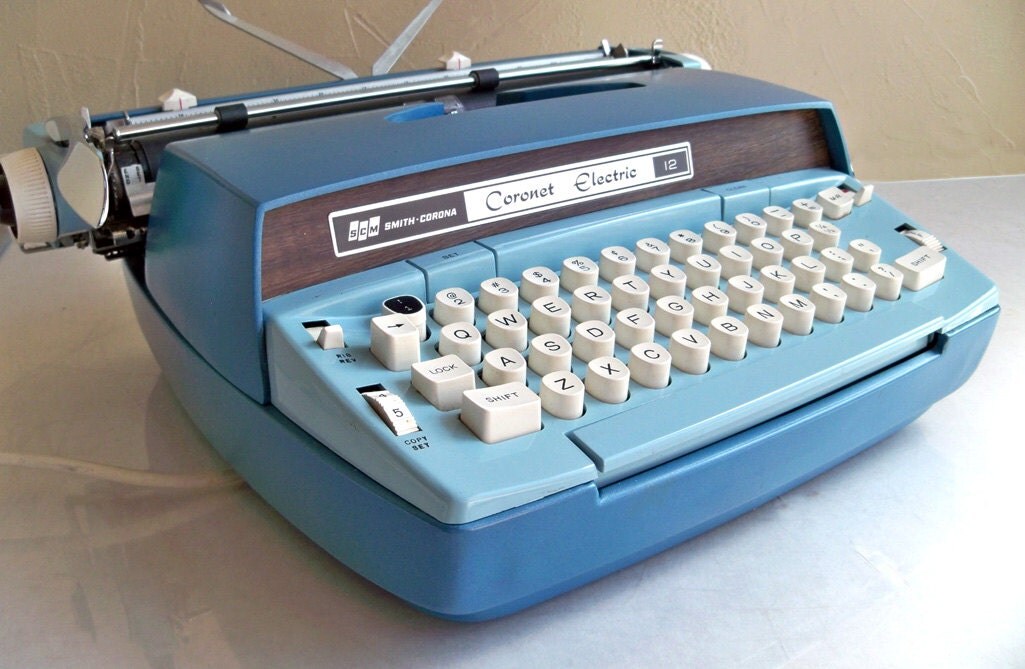
So far, success. The Smith Corona Coronet Electric Portable was the first typewriter he used for a big assignment he never turned in. It is a clean typing machine that hummed as he typed. He made a lot of mistakes and was surprised when I expected him to redo his work to have fewer errors.

The next day he tried the Royal Alpa 2015. This was the generation of typewriter that was categorized as a word processor. It came right before the personal computer.


Tuesday, March 19, 2013

Midway Muddling

It is midway through the semester.

The students are losing interest in the work.

Unfortunately, the equipment has begun to affect their grades. When they can't submit their quizzes, or have to fight to stay logged into their blogs, they quit. Many students did not have all the posts they were supposed to have had for the recent check. The excuses varied from 'I tried but...' to 'When I don't have to re-do it over and over, I'll do it.'

Yes, this sounds like my students are belligerent do-nothings, but they are fed up. The technology they have in their pockets, and in their lives outside of school, is a different world. School is where everything is slow and frustrating, whether is it paper or what we're doing now. They cannot use their own devices because cellphones and iPads are not allowed in school, so it is supposed to be a secret that they carry them.

Every day I watch the students try to log into Chrome over and over, only to be confronted with a System is down or System cannot be found  page that pops up showing the broken robot caricature. This week they are starting the active research using search engines, databases, and Son of Citation Machine.  They are clearly tuning out. If we had used the index cards, there would not be so much disappointment.  "When do we get the Chrome Books?'

When indeed?  I am feeling guilt and helplessness asking them to continue working this way with equipment that clearly cannot support the required tasks. In my gut I know when they finally DO arrive, I'm supposed to be happy and falling all over myself in gratitude.


Friday, March 15, 2013

Another Insight

Another aspect of 'blogging' about the lessons and the thinking process attached to the research process has been the quick turn-around remediation I can do before the quizzes. I have quick access to what the students are doing, and what  they are understanding or NOT understanding. I can check the blogs (used as journals) frequently during the week so any misunderstanding can be corrected quickly.

That's been worthwhile.

Monday, March 11, 2013

Authentic Data

Surveys can be valuable for
collecting opinions
or identifying trends.
The students are starting to work on their authentic data constructions. Interviews, surveys, and experiments generate data that can prove or disprove a project's essential question. For the surveys, the students will learn how to use Google Forms and Spreadsheets. This will be far and away a more efficient way to gather data and make graphs.

Sunday, March 10, 2013

Lessons Almost Done

The research lessons are almost done....only a week away. The assessments have gone well this semester, in spite of glitches with the technology which has been documented. There are some striking differences between the paper and digital versions of this research class that are worth noting.

www.gabrielweinburg.com
1) Students are doing more writing in their blogs than they did in their journals. While it is true the students who were always writers still write, overall the amount of writing has been more extensive. The connection between the lessons and the projects has been more detailed, and have been illustrated. More connections are being made.

2) The assessments, overall, have shown the students are understanding the lessons without having to re-teach portions of the lessons for re-testing. In semester's past, the quiz would indicate portions of the lessons I thought were understood were, in fact, not. This led to re-teaching and re-testing. This semester, the first test is all that has been needed to show that students have connected concepts to their research topics. Students may miss one or two questions, but in my opinion the blog writing has helped.

3) I can access their writing without having to ask that journals be left behind. I can make comments and move on while they work. So, the students know I can see their writing immediately, they know their blog is open for others to read, and they know their parents can read the blogs. All around, it is not as easy to slip through a class period anonymously and then end up with an empty (or token) journal at the end of the week.


Friday, March 8, 2013

Frustration

Yesterday the level of frustration with the wireless connection sent several students at one school into overload, expressing by slamming shut their laptop lids and refusing to work further. Two of these students had taken the Packet 4 quiz three times without getting it to submit properly due to equipment lock-up or shut-down. The IT person for the school visited the class twice.


www.electronicstakeback.com

Today, a thought came to me about why it is that one school has more troubles than the other one with the same type/age of equipment. What I did this morning was to take all the laptops out of my office and set them up in the library where the wireless connection box sits on the check-out desk. So far there seems to be an improvement with connectivity.  Of the two classes, the IT person only had to visit once and that may have been because the student anticipated the usual trouble. By the time IT arrived (within a few minutes), the student had figured out something and all was well.  Clearly, the plan for that school is to arrive early, roll the laptops on a cart 10 feet from my office, plug them in, and we're good to go.

flatclassroomproject.org


more about Distance Learning

Some students did, in fact, access their blogs and took the quizzes. They came back to school after the snow day prepared to move on with the lesson previously planned for the day. Others had excuses about web access,  parents not willing to give up the computer, and just plain forgetting they could had access to school work at home.

In Chicago, school districts have planned distance-learning days for the purpose of practicing learning from home in case of blizzard or flu pandemic. I know very little about the results of those trials. I wonder if students get used to doing distance learning if it would be more utilized and therefore become routine.

Tuesday, March 5, 2013

Distance Learning

sophlylaughing.blogspot.come
A snow storm is coming. The students are excited. The students were surprised when I said they are still held  for their quiz and blog/notes check on Thursday.  Being on the Cloud allows for access anywhere and this will be the test since everything they need is available: lessons through next week, rubrics, quizzes, grades, spreadsheets, research sources....it's all there for retrieval and self-pacing.


Friday, March 1, 2013

March 1, 2013

No ChromeBooks. Students have been bringing it up everyday when their machines lock up, turn off, or lose access to Google and/or the wireless connection.  Today, students began mentioning their parents are asking.

paulgotthardt.com
Several have lost posts they've worked when their machines lock up, or turn off without warning. It takes quite a while to log in and repeatedly try to sign into Chrome to get to their lessons and blog. When I use my desktop, I get right into Chrome with no trouble. But when I use a laptop it is chancy if I can get to Chrome much less use it. Will these issues be present with the ChromeBooks?  The second school I work with has far fewer problems with the machines and the connection. The curiosity is present with those students but not like the level of frustration I see in the students during the first two periods of the day at the first school.

Wednesday, February 27, 2013

Walk-Ins

craigsenglish.com
Today a student walks into my class with his friend who is in the class. The new student proceeds to open a laptop and start to log in. It turns out his mom and guidance changed his elective, without telling me. OH?

Whether there is a study taking place for not, we've gone too far in the lessons to consider the possibility of catching up at this point. The guidance counselor should have investigated before making such a change. Some students who have been in the class all along are averaging Cs. It's a challenging, fast-moving research course. I hate being the bad guy when it is obvious that his friend (the one he came into class with) had told him how cool the class is and what we're doing. It sounded more appealing that the elective he is currently taking. The counselor gave me the parent's email so I explain.

UPDATE:  Parent left an voicemail and is clearly upset. She 'has serious questions about my email' and will also be meeting with the counselor and principal. Again, I should have been asked and no, in my experience he will not be able to catch up, the semester is half over.

Tuesday, February 26, 2013

Another man down...

Another student in the study will not be completing the semester -- his family is moving to Florida at the end of April. As it is, he is missing this week's of lessons because they have gone to shop for housing and a new school. I"ll probably have him complete his post-surveys before he leaves and mark them as early. Since he is a newbie to the course, he won't have had the previous experience but he will be able to make judgments about the difference in using Chrome with the old laptops and the new ChromeBooks.

Monday, February 25, 2013

Heat-Driven Madness

One of my offices was 85 degrees this morning, making the laptops for the first two periods of class ill-tempered. One student in particular did absolutely nothing for the whole time except try to get his equipment to work. What a waste of time and learning potential! We sat the laptops on top of dominoes to get some air movement, but it was clear the warmth of the room was impacting the technology because the usual locking and wireless-loss that happens on a day-to-day basis was accelerated and in some cases accented with additional woes.

blog.2shopper.com

Friday, February 22, 2013

Blogging and Being Blogged

Today was the second Blog Check for the students blogs. Last week the checks revealed that many of the newbie students had spent too much time playing with the complexities of designing a blog instead of posting the lessons and connections of the lessons to the project at hand. This week, for some unexplained reason, they spent more time redesigning their blogs than writing their posts connecting the lessons to projects. When the grade were handed out this morning.....Oops! Deer in the headlights....

arthurmcarthurs.blogspot.com

The afflicted were the students new to the course. The repeat students played with their design the first week or so, then settled into working on the post to tie the lessons to what was happening with their topic. The newbies have gotten caught up in the bright lights of technology. MY lesson?  Prepare the students ahead of time to look at the rubric, compare what they have done with what is expected, and perhaps show examples of good and not-so-good blogs.  I have my own blog for my project [I do a project every semester along with the students so they can see research happening] but not many took advantage of it as a template for what I expected. There's another lesson in that, I just haven't figured it out yet.

Thursday, February 21, 2013

A Clarity Footnote

blog.microsecommerce.com
Brainstorm in action!

What if we do a mid-program survey once the kiddos have had the ChromeBooks for a week. THEN, the experience of the old technology will be fresh for all the students, not just those who have taken the class before. The repeat students will of course have extra depth because of their experience with the handwritten journals and note cards. The students new to the course will have knowledge about how their processes worked on the older, slower equipment compared to the new, faster equipment.

So, actually, lemons and lemonade and all's going to work out better in the end!

Saturday, February 16, 2013

Clarity in a Nutshell

A 1 hour+  Clarity meeting in a nutshell:

The IT Director had not known there was a study, or a grant, or Informed Consent letters signed by parents and  students. He said the order for the ChromeBooks was place Thursday and that they should arrive in 2 weeks. There will be no student YouTube or AudioPlayer access (my current biggest concern because of the tutorials).

Since last fall, his IT minion had been leading me into thinking I would have this app or that app to accomplish high-level digital learning with ChromeBooks when the grant came through. He told me 3 weeks ago the Chromebooks were back-ordered and wouldn't be in until March. He sat silent through most of the meeting.  When he did speak up toward the end, it was to expound on the wonderful-ness of the Teacher Dashboard component and what it can do.  There was no mention if this came with the ChromeBooks or it was (as in the EasyBib APA format issue) a purchased add-on considered for the future. There was commitment for Teacher Dashboard training when the CBs DO arrive in spite of pointed questioning.

Basically, I have what I have and should make do with what I have, no matter how long to takes to get newer equipment. Luckily, I am inventive and now that I know where things stand I can begin to prepare successful lessons using the free digital tools available.


Shenandoah Visits

We had a visitor today! The students were excited to show their journals and notecards from last semester. Pictures of the artifacts were taken and opinions were shared. The professor and I discussed the wisdom of doing interviews with the students at the end of the semester instead of relying only upon the post-study surveys.

www.iris.co.uk
www.copyblogger.com
 Also, it occurred to me that, in some off-kilter way, it may be a good thing the ChromeBooks have not arrived yet. When they DO arrive, the students not only will have had the experience of trying some digital tools to do their research and documentation (a contrast from the handwritten documentation from previous semesters), they will have the contrast of going from the older technology to the newer one. Using Google Docs is one thing on our old laptops, but to then move to using Google Docs with SPEED...where they can open the lid and the device is up and running within seconds instead of a dozen of minutes...will be an amazing realization.


Thursday, February 14, 2013

Clarity

It is profoundly ironic that today is the day a face to face, heart to heart meeting was announced for tomorrow -- today being St. Valentine's Day and all. What inspired such action?

Today, the students were sent to my blog to see how my semester project is evolving. I use my blog as a template to model a research project in the making. The demonstration was to be how to embed links into text, and specifically how to link sources to the point a person is making in writing. In this case I was explaining how my project has evolved from gourds and papercutting to gourd books and, now, gourds and musical stories. I found a ukelele site with music and had embedded a link to the song Follow the Drinking Gourd, and the Audio Player file that went with it. The students could see how telling my story can be communicated without including every single word, but embedding links for illustrative purposes.

Like YouTube, the students are blocked from accessing it, or any of the songs at the site. My demonstration was for naught. I emailed my IT specialists at both schools and copied my Gifted coordinator asking for help and guidance since now we are a month into the class and I'm having to re-work lessons from the original idea -- at this point, having the students get access to online sources would be helpful. All I am told is that there is discussion about getting an educational YouTube or some version of a safer YouTube, but there doesn't seem to be any urgency.

msraspberryinc.om
My coordinator sent out a strong message to a handful of people at the school board and now there is a call to have a face to face and heart to heart meeting where everything can be put on the table for clarity. What does that mean in corporate-speak? One message clearly suggested that one person did not know there was an urgency to this issue. My, myMYmymy.

 But, tomorrow between 1 and 3pm we will get some clarity.


Wednesday, February 13, 2013

Notes & Citation Work-Around

We don't have the ChromeBooks yet, or permissions to use the EasyBib, Jing, Diigo, or YouTube apps that were supposed to be part of the program.  Yet, we start the Packet 3 -- Making Notes lessons tomorrow so since the point is to do research using digital tools I am making a work-around.

What I've done is prepare another way of doing notes without using index cards. A Google Doc spreadsheet, along with CitationMachine, can be utilized to align the notes with the source. Sources and notes not as legitimate as others can be highlighted.

sarahockler.com
Initially, the student would go to their Drive, click on Create to choose the Spreadsheet option. When it opens it is titled. CitationMachine page is opened for ready use as well. As the student finds sources that look productive, they use the citing page/program to capture the source citation and copy it along with a code into the A column; the in-text citation is shown as well. Then, information from that source can be paraphrased and coded to the A column code to mimic what happens when using the Index Card System: the notes and sources are coded to each other.

Two students who have taken this before, and have used the Index Card method, agree this is much better and are excited to start using it this week.

Tuesday, February 12, 2013

Adjusting Roster of Participants

blog.turbotax.intuit.com
Casualty, but providing valuable knowledge for the overall program.

Friday afternoon the Spanish teacher came to me visibly overwhelmed with his part of the program [he was to teach Spanish through the cloud with one of his students who was a previous student of this class]. We were allowing her to use her Spanish class as her topic for the research class.

When first discussed in mid-December, this teacher was very excited and openly stated his gratitude for being considered as a part of this pilot program using Chromebooks and digital learning. At the time we looked at Voki and other options for the vocalizations, and hashed out a broad plan for her assignments and assessments, ultimately developing a tour of Spanish countries using Maps as her final project. Later, in early January, he requested my notes from that meeting since he had lost his copy [in hindsight this was the first sign I did not heed]. I thought it all looked good since the principal approved the plan, the Director of Instructional Services approved was excited by the possibilities, and the parent and student were willing....everyone was a go.

But then it was difficult to connect with the teacher again [second sign when bells should have clanged loudly]. Meeting times were difficult to arrange due to his schedule, emails were not answered, and before I knew it the semester had begun.

Initially, we spent the first week of the semester working with IT to set up the laptops we had and the students' blogs since the Chromebooks would not be in for a month or more. Blog accounts were made and the students began with their PRISMS lessons. I found out the Spanish teacher did not have a school Google domain account though he thought he did. That was arranged so he could send the first assignments. Two weeks into the semester the student finally got a study guide, a handout, and a PPT assessment which takes her two days to complete. Now she's 2 1/2 weeks behind her peers.

When the teacher came to me, he did not like how she had done the assessment digitally and wanted me to have her re-do it and save it to Word before sending it back again, clearly not understanding this program is not using Word but working with Google Docs. He had yet to look at her blog and see the assignments she had posted there along with other Spanish research beginning the Spanish tour.

I have narrowed the problem to two issues:

 1) The learning curve for the teacher organizing lessons through the Cloud was too steep at this point to match the student's needs,.
2) A side issue is that the online speaking apps intended for her case cannot run on the laptops currently used. Since it is unclear when the proper equipment will arrive, the original concept did not happen. I don't think the teacher would have been able to learn and use them in a timely manner anyway.

Since my intention and my commitment to both parent and student was that her grade would not be affected by participation in this study, she has been returned to the Spanish class. The teacher has agreed to tutor her during lunch until she is comfortable with her lessons. She will keep the blog as a Spanish diary for enrichment as she moves through the semester and works on her Spanish final project.


Monday, February 11, 2013

Students Taking Outside Classes

Another interesting aspect to this semester has been the two students who are taking this elective because they were switched out of their regular cluster US History class into a smaller and slower moving US History class where differentiation would be challenging at best.  Both students have taken PRISMS before and this looks at how digital learning can be used for effective differentiation.

Background: Both students had taken are in the gifted program and have take this research elective before. They wanted to take it again but were in a US History class scheduled for the same time because it was the gifted cluster class. With permission from the school board and their parents, the students were moved to a different US History class to open the time slot for this class. The new US History period is a small, academically slow-moving group of students. They are racecars in a garage of 4 cylinder cars.

The teacher works with the whole class for the lesson but has the two girls form their own group when group work is required. The girls have been given laptops from the my class and have built a blog to work on a semester-long theme for US History: Strong Women of War. When their work for the day is done, they go to their laptops and drives, see what I have Shared and work on connecting women to the time period being studied. They explore the politics, economy, and society rules as they apply to women at the time.


So far the girls are having a blast learning the broad concepts of US History and then the details that made life different for women from men at the time, and different for women then from women now demonstrating differentiation possibilities not only for gifted students, but for any student whether they need remedial assistance or enriched challenges.

Friday, February 8, 2013

Politics and Perspective

The decision to allow the students to view the YouTube tutorials and to finance the APA  version of EasyBib is still in the offing. I have approached my Gifted Coordinator to plead my case and she agrees with my arguments for both.  I am hoping that reminding the IT director 1) that I have permission forms signed by parents and students allowing online access to tools necessary for this class, 2) that there are only 17 students, and 3) that this is only for one semester will encourage positive action.

Next week the class begin making notes and doing the active research. Even though I am frustrated with the lesson planning, the students seem excited about their topics and learning new stuff. Yes, they are frustrated about not having the new technology they thought was going to be here by now but that passes when they visit each other's blog and return to their own to improve their posts...a subtle competition of thinking.

I have told the students the story of African classrooms where only one computer exists and the students practice 'typing' on a paper 'keyboard' taped to the back of a shoebox until their turn at the computer. We've printed out a keyboard image and taped it to the wall in both schools as a reminder of how blessed we are even though it may be challenging at times.


Wednesday, February 6, 2013

A Bright Spot

I reviewed the blogs today. An observation I can make, even at this early stage of the program, is that the students are more contemplative in their writing than they were in the handwritten journals of previous classes. For myself, being able to leave compliments and quick comments for information correction has been a revelation in time management! Students' mis-thinking is informal and nonthreatening -- and to a gifted thinker, the low risk of failure would be a plus.

Why would that be?  Typing is better than handwriting?  Peer pressure is more compelling than accomplishing an assignment? Combining blog features of color and personalization is more interesting than using a notebook?

EasyBib Done Right, or Wrong

EasyBib is a remarkable citing and writing app that targets the specific needs of research. When a collection of teachers and administrators met with the Google rep to review possibilities, this app was hawked as the researchers dream because it can move from MLA to APA, making research easier than manually citing sources.

Since my gifted program research students work at a higher level than school-age peers, and therefore use APA format, I was especially interested in the possibilities in that area. The rep explained how EasyBib allowed students to make digital notecards, evaluate sources and cite them as in-text citation on 'the card' before dragging them to an outline. I was especially struck how EasyBib led the student to rank sources for legitimacy to see how valid one source is over another.

When going to learn these techniques myself before showing the students I find MLA is free, but to use the APA option I need to purchase the Pro version of EasyBib. That decision is being haggled about at the SBO, hopefully with a decision by next week when Packet 3-Making Notes lessons are taught. Right now I am told that if Pro cannot be purchased, then I have to use MLA. So I get to use EasyBib the wrong way (for my needs) or revert to manual note making with index cards and writing implements or perhaps invent some version in between where a Google Spreadsheet can be a template for the index cards and then use Son of Citation Machine for the citing tool.


The reinvention will keep the note-making digital, still incorporate typing skills, and use a Google app (Spreadsheet) to make the citations, but it does not allow for dragging notes to an outline to build a paper and it certainly does not prioritize sources for legitimacy.

Still, one positive we discovered is that posts appear to be saved automatically as a draft when the laptops shut down without a goodbye or thank-you-mam. Many bloggists have been saved that way!

Lesson Plan Work-Arounds and YouTube

This week has been a exercise in working around the fact that the Chrome Books are not in and the laptops we are using are old and cannot support the demands we are making...not enough memory to handle the Site, and pages and blogs and so forth. Many students type and navigate so quickly that the laptops fall behind and freeze in place in order to catch up to the number of click demands that have been made. Several machine will not always log in, or stay logged in.

OK, we're not talking this old, but still.

Yet, in spite of these equipment issues, the lessons move forward. This week has been Packet 2-Questions. The students have a Shared document outlining the required posts I expect to see when I grade them next Monday. They have been taught to prepare target dates and action dates in their project planners (calendar). I have noticed that the thinking about the lessons this time around has been better, and more questions have been asked for clarity. My suspicion is that they are aware others will be looking at their work and making judgments. One repeat student (an especially shy one) has mentioned she is not fond of the fact that her blog is open to others....she liked being able to keep her journal private. Others are keeping each other on their toes, and making helpful comments.....

.....which brings me to the YouTube issue. I have posted on the class Google Site a number of email etiquette YouTubes that will show how to write comments in a professional way. Before we get too far into the semester, I would like for the students to see those so comments they leave each other are appropriate. The IT department is figuring out how to allow that since students are never allowed YouTube access within the school domain.

Thursday, January 31, 2013

There is Light!

Today the IT specialist from both schools attended my morning classes. The students began reading their Questions handouts from the Google Site and collaborated on a Google Doc: Packet 2 Notes. They are building a study guide and question list for the Packet 2 quiz.

Initially there was a dance of access, since the Google Groups made yesterday were visible from one school but not the other. That was corrected and  things got lively!  Most of the students in Period 2 are repeaters so they did not have to linger over the reading as long as Period 1. The study guide is building, and the quiz questions are being formulated.

Some had time to introduce more gadgets into their blog, heightening their opinion of Blogger as a journaling tool. Locating personal gadgets that make their blogs useful was successful as far as I could tell. A couple students started to get overzealous with off-topic gadgets and toys, but once they were reminded that this particular Blog is topic related the choices were more focused.


Big sigh of relief today.

Wednesday, January 30, 2013

YouTube For Learning

When I was going through the technology graduate course last semester, I found that many things I did not know how to do could be learned watching YouTube videos. In fact, I found I could learn in a short 1-2 minute video what I would otherwise have needed to spend hours reading about.

This is the lesson I wanted to impart through my class website -- teach some of the lessons via YouTube instead of bogging down the students with numerous handouts (which they probably were not going to read anyway). I assume that, like me, they'd rather get the nugget of information they need than sift through a lot of reading to find help.

However, the students cannot access the YouTube videos I have embedded in the Site. They can see it initially, but upon clicking on the play arrow, a box pops up saying they do not have permission. I have run the Researcher vs. Retriever video in my computer for the small group to gather and see, but really?  We wanted to have a self-pacing class whereby students accessed what they needed when they needed it...not always wait for everyone to see and hear the information at the same time.

Black Screen (starring Black Screen)

Apps Aquisition

This plan was to move forward and try to have the old laptops run the apps we need for this class. IT took  all other programs off the computers to keep the equipment from running background programs. I found the apps I wanted the students to add to their Google Drive from the Chrome Store. Since it is early dismissal for parent conferences today, going on a virtual shopping trip was the perfect way to lighten spirits with visual progress.

I went to the Chrome Store, got EasyBib, Diigo, Idea Mapper, dictionary.com, Google Maps (which I didn't need because it's in Drive already, as is Google Calendar). The students arrived, got logged in and then signed in, and when trying to get the apps they were met with warning boxes saying they had no access.

Back to another Plan B, which was to revisit the Blogger lesson and writing their first post about the first lesson: What is a Researcher? based on a YouTube I showed them yesterday (which they could not access from the Google Site themselves, so I had to show it on my desktop computer--totally defeating thec concept of self-pacing).

What's the point of having targeted tutorials for self-pacing lessons if I have to gather everyone whether they are ready or not for a communal viewing? Now I'm wondering, do I go back and prepare handouts and binders again?


We are behind and it seems that many students need to have their hand held for every click they make. Very different than the digital literacy survey would have me think their abilities are.

Tuesday, January 29, 2013

ChromeBooks back-order

So, this is my story today:

My current technology is locking up and essentially flipping out because of what we're trying to do on it. The students have re-taken the surveys after several tries against freezing screens and slow loading, and are getting frustrated and rolling their eyes since this is basically more of the same (for those who have taken this class before). IT at the School Board Office says it will be another 3-4 weeks until I get the Chrome Books to which you can imagine how MY eyeballs were rolling into the back of my head.

For now, the solution is to strip the laptops I currently use of all school division stuff except Chrome so when it is being accessed nothing else is running in the background. That is supposed to make them work more efficiently. Tomorrow we get the blogs set up so the url's can be put into the Accessibility survey. Friday, the IT guys visit both schools and do a Blogger audit to see that what we have can be used.

I can barely believe the level of frustration I feel. The money is there, the plan was in place for what seems like forever, and now we are waiting for Samsung to manufacture the units. Geez.

In hindsight, it would have been helpful to be told what was happening. I could have planned my lessons according, the students could have been prepared, and the transition between the old way and the digital way could have been smoother.